Skip to content
How ChaloCRM works

See who needs attention.
Finish with a next action.

ChaloCRM is built around daily sales work: know who to contact, record what happened, and make sure the next follow-up is not forgotten.

Free

Know exactly who to call today

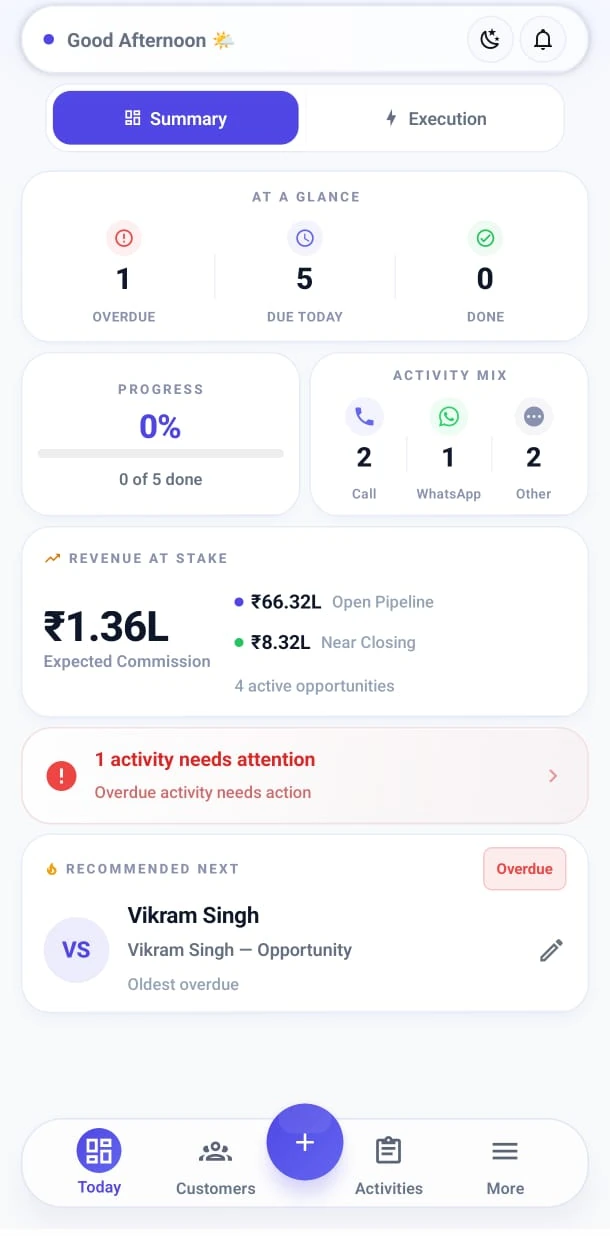
Today combines overdue follow-ups, planned work, and customers waiting for attention into one daily queue. Then work through the list one conversation at a time.

  • Today’s follow-ups
  • Overdue work
  • Waiting For
  • Renewals queue
  • Works offline
ChaloCRM Today screen showing overdue and scheduled customer follow-ups
Today — overdue work, due today, and the recommended next customer.
Free

Keep every relationship in one place

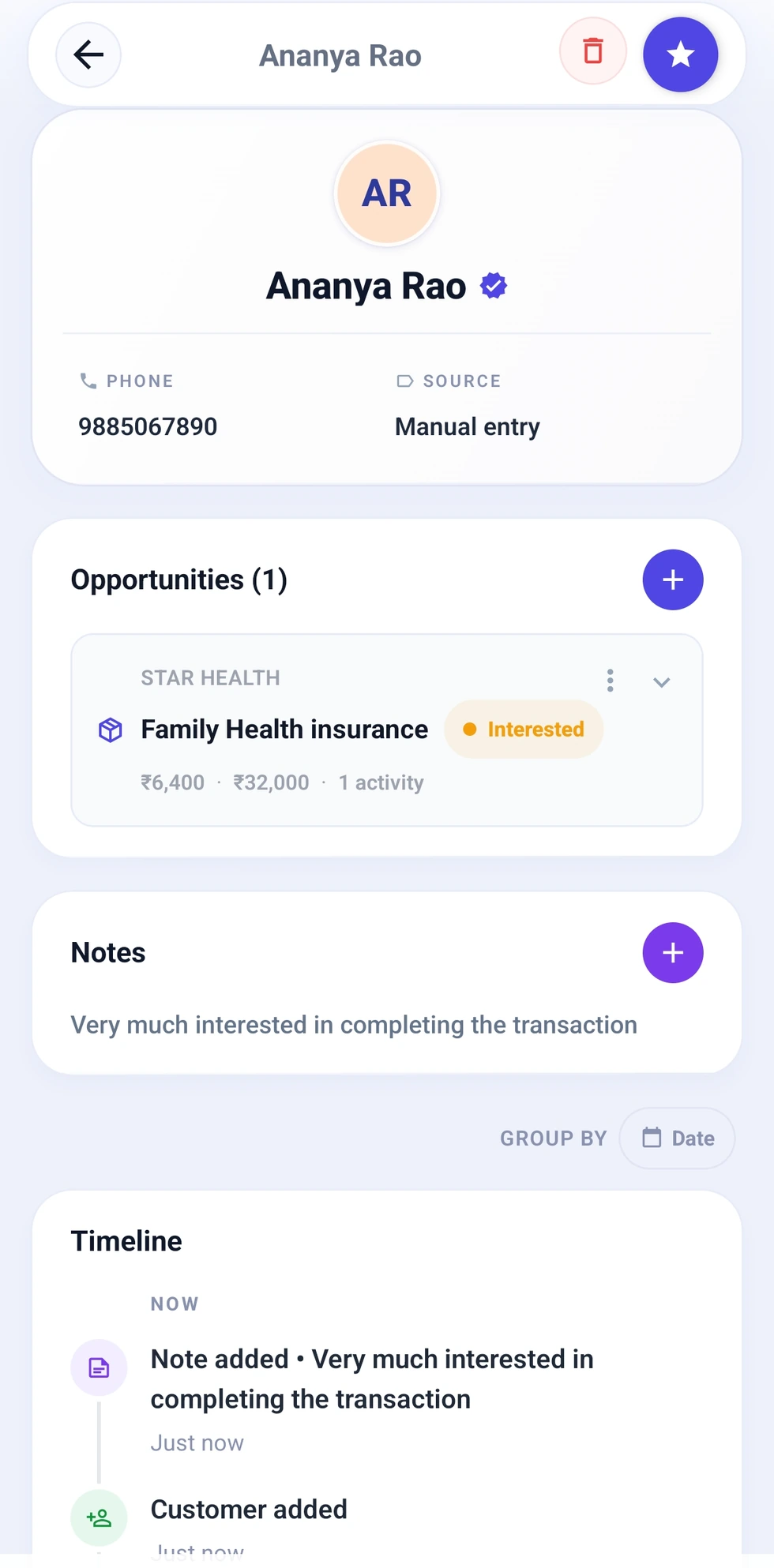
Each customer holds the relationship: search, locality, notes, and the history of every conversation. Import from contacts or CSV when you already have a list.

  • Search by name, phone, or area
  • Full conversation timeline
  • Locality for field days
  • Contact and CSV import
ChaloCRM customer detail screen showing relationship and opportunity context
Customer detail — the relationship, opportunity, and history on one person.
Free

See where each sale stands

An opportunity is the potential sale on a customer — stage, value, and Waiting For items such as Aadhaar, PAN, or income proof, surfaced on Today.

  • Stage and value on the deal
  • Waiting For on Today
  • More than one opportunity per customer
ChaloCRM customer detail screen showing relationship and opportunity context
Customer detail — the relationship, opportunity, and history on one person.
Free

Finish with a next action

Every conversation can end with a scheduled follow-up. Use a suggested time or a one-tap chip such as Tomorrow morning, then save and move on.

  • One-tap schedule chips
  • Reschedule when plans change
  • Next action sits on the customer
  1. ContactCall Ravi
  2. Capture outcomeInterested
  3. Schedule nextTomorrow morning
  4. Move onDone ✓

No forgotten promises. Next customer.

Free

Call or WhatsApp, then close the loop

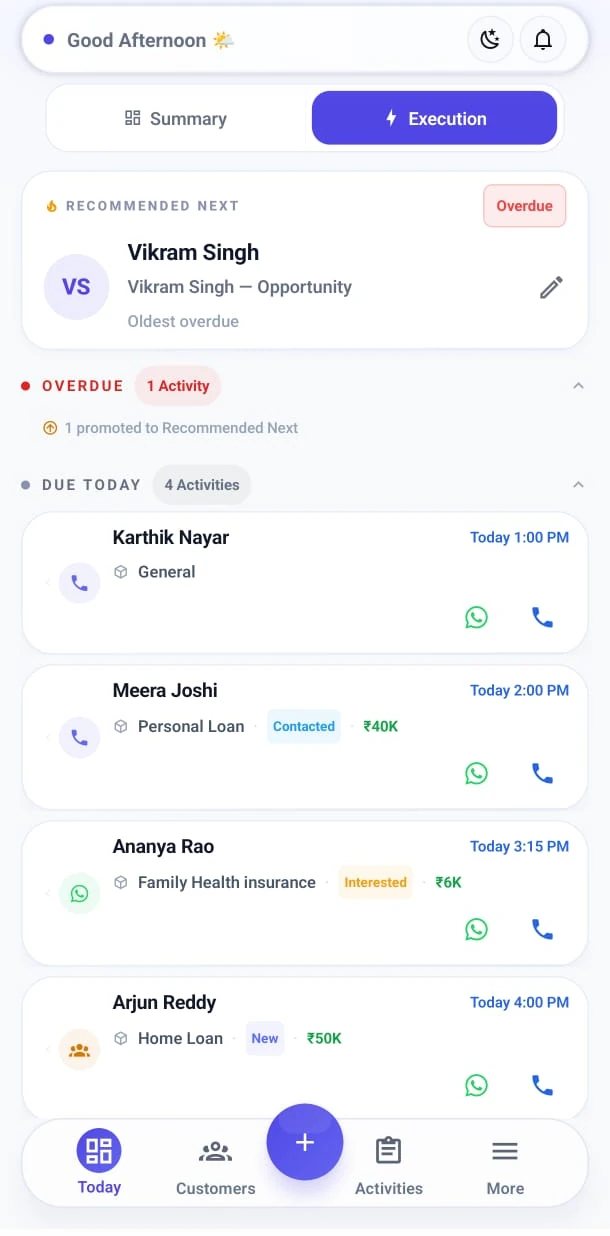
One-tap Call or WhatsApp from the customer, then capture the outcome and the next follow-up. ChaloCRM opens WhatsApp on your phone — it does not send messages for you.

  • One-tap Call and WhatsApp
  • Outcome capture
  • Optional notes and Waiting For
  • Visit prep for meetings
ChaloCRM Today Execution screen with Call and WhatsApp follow-ups for today’s customers
Today’s work — contact from the queue, then move to the next customer.
Plus

Work a list without losing rows

Turn an imported batch into a campaign and work it person by person — relationship conversations or a simple “message sent?” check. This is systematic follow-up, not mass-marketing automation.

  • Import becomes a campaign
  • Progress on contacted vs pending
  • Work the list person by person
Plus

Share the same product story

Keep product benefits, WhatsApp intros, and brochure files with the product so you can share them from the same conversation.

  • Benefits and intros
  • Brochure PDF
  • Templates for faster outreach
Plus

See what moved, and what may earn

Insights and the Commission Dashboard answer what you completed, what is moving through the pipeline, where opportunities stall, and what may be earned.

  • Activity completed
  • Pipeline movement
  • Commission on won work
Free

Work anywhere. Lock the app. Keep a copy.

The CRM works on the device without internet. PIN or biometrics lock the app. Core CRM syncs when you are signed in. Sync health, restore tools, and export (ZIP / CSV) are Plus.

  • Offline-first on Free
  • PIN and biometric lock
  • Core CRM sync when signed in
  • Backup tools and export on Plus
Sales toolkit

Sales calculators built into the customer conversation

EMI · Eligibility · SIP · Premium · Commission · ROI + more — on Free.

See the calculator list
EMI CalculatorLoan EligibilityInterest CalculatorAffordabilityCommission CalculatorRevenue ProjectionTarget AchievementIncentiveSIP CalculatorFD ReturnsWealth GrowthPremium EstimatorGST CalculatorProfit MarginROI CalculatorChit FundChit AuctionChit Commission

Your next follow-up starts on ChaloCRM

Try all Plus features for 15 days. Continue on Free or upgrade to Plus afterward.